Client Portal Guide Guia del Portal de Cliente
Your window into your affiliate program with RELO: track revenue, units and product-segment performance in real time — a clean, read-only view built for brand teams. Tu ventana al programa de afiliados con RELO: monitorea ingresos, unidades y el desempeno por segmento de producto en tiempo real — una vista limpia, de solo lectura, hecha para equipos de marca.
Getting in Entrar
You'll receive an email invitation from RELO. Click the link, set your password, and you'll land straight in your portal. After that, just sign in with your email and password. Recibiras una invitacion por correo de RELO. Haz clic en el enlace, define tu contrasena y aterrizaras directo en tu portal. Despues de eso, solo inicia sesion con tu correo y contrasena.
Once inside, the layout is simple. A month picker at the top lets you change the period you're looking at. Below it sits a KPI row with your headline numbers, and a set of tabs: Una vez dentro, el diseno es simple. Un selector de mes en la parte superior te permite cambiar el periodo que estas viendo. Debajo hay una fila de KPIs con tus numeros principales, y un conjunto de tabs:
- Overview — your month at a glanceOverview — tu mes de un vistazo
- Performance — daily trends and source breakdownsPerformance — tendencias diarias y desglose por fuente
- Segments — revenue and units by product lineSegments — ingresos y unidades por linea de producto
- Trends — how the program is moving over timeTrends — como evoluciona el programa en el tiempo
- A "More" menu holds additional views.Un menu "More" contiene vistas adicionales.
Your dashboard (Overview) Tu dashboard (Overview)
The Overview is your month at a glance. The top KPIs summarize the period — total revenue, units / orders, average ticket, and a projection for where the month is heading. El Overview es tu mes de un vistazo. Los KPIs de arriba resumen el periodo — ingresos totales, unidades / ordenes, ticket promedio y una proyeccion de hacia donde va el mes.
Below that, an Insights card calls out the highlights in plain language: your best day, the peak hour, how revenue is spread across segments, and the pace you're on for the month. Use the month picker at the top to compare one period against another. Debajo, una tarjeta de Insights destaca lo importante en lenguaje sencillo: tu mejor dia, la hora pico, como se reparten los ingresos entre segmentos y el ritmo que llevas para el mes. Usa el selector de mes de arriba para comparar un periodo contra otro.
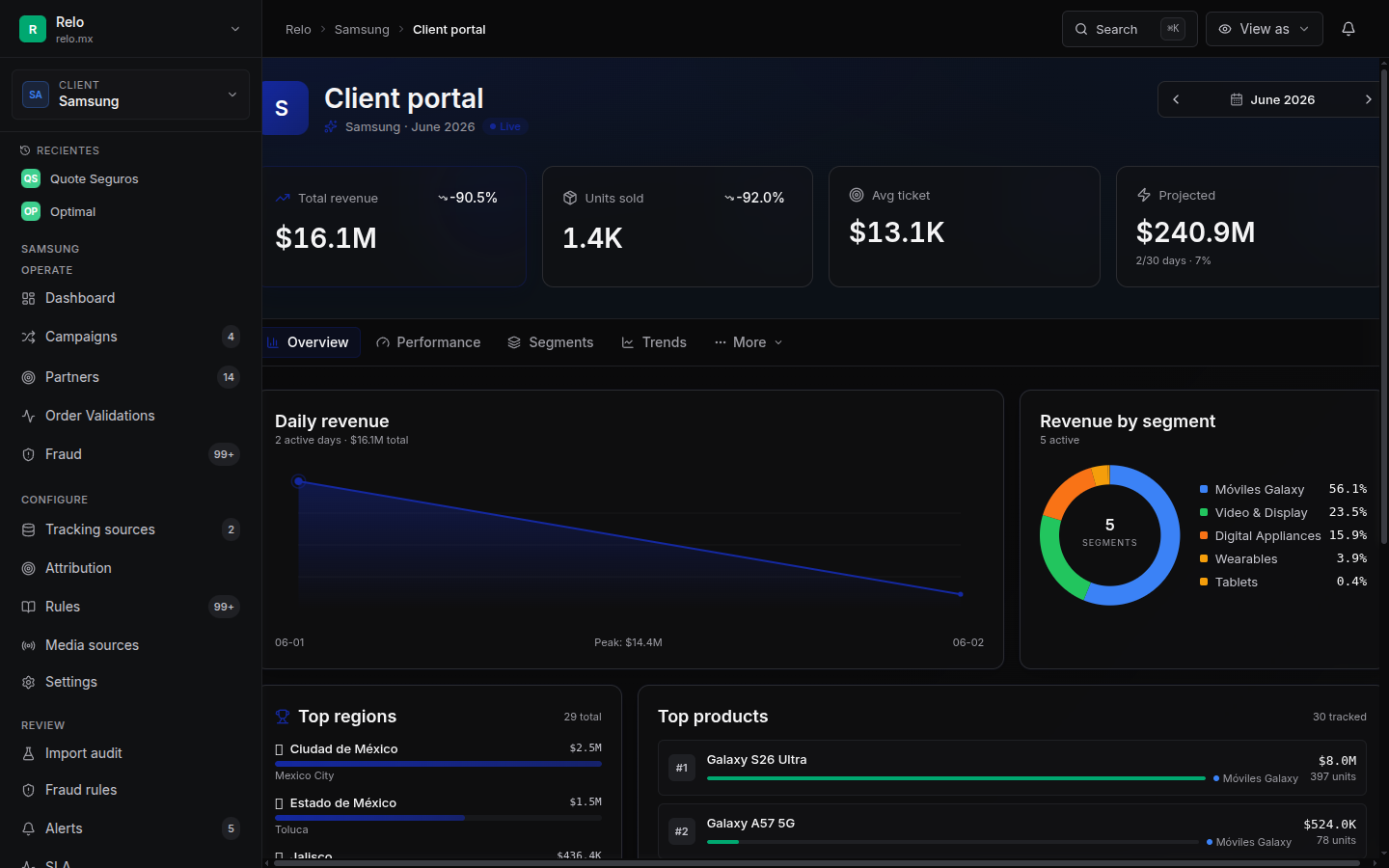
Everything here is aggregate. Each panel describes the whole program — not any single partner. The month picker is the fastest way to move between periods. Todo aqui es agregado. Cada panel describe el programa completo — no a un partner en particular. El selector de mes es la forma mas rapida de moverte entre periodos.
Performance by segment (Segments) Desempeno por segmento (Segments)
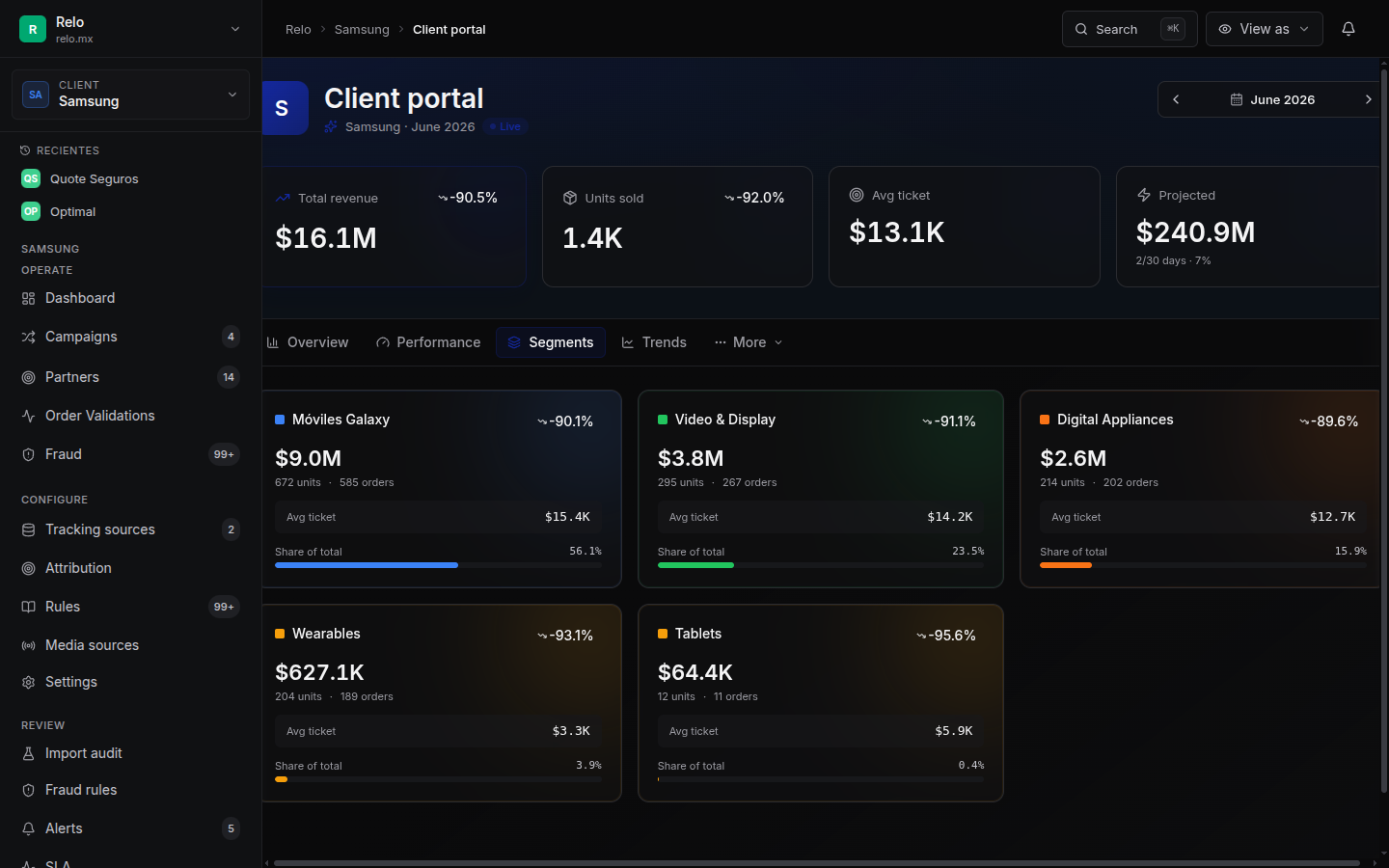
The Segments tab breaks your revenue and units down by product line — for example MX, VD, DA, IT and NW — so you can see which categories are driving the program.
El tab de Segments desglosa tus ingresos y unidades por linea de producto — por ejemplo MX, VD, DA, IT y NW — para que veas que categorias estan impulsando el programa.
For more depth, the Performance and Trends tabs add daily trends and source breakdowns, so you can follow momentum and see where the traffic is coming from. Para mayor profundidad, los tabs de Performance y Trends agregan tendencias diarias y desglose por fuente, para que sigas el impulso y veas de donde viene el trafico.
Orders & export Ordenes y exportacion
You can browse the underlying orders for the selected period and export them to CSV for your own reporting. The order list shows the product, its segment, the location and the time of each sale. Puedes explorar las ordenes que sustentan el periodo seleccionado y exportarlas a CSV para tu propio reporteo. La lista de ordenes muestra el producto, su segmento, la ubicacion y la hora de cada venta.
What the order list never shows is which partner drove each sale — that detail stays on RELO's side. You get the full picture of what sold and where, without the commercial layer underneath it. Lo que la lista de ordenes nunca muestra es que partner genero cada venta — ese detalle se queda del lado de RELO. Obtienes el panorama completo de que se vendio y donde, sin la capa comercial que esta debajo.
What you see — and what stays private Lo que ves — y lo que queda privado
You see the full performance of your program — revenue, units, segments, trends and orders, all in real time. Ves el desempeno completo de tu programa — ingresos, unidades, segmentos, tendencias y ordenes, todo en tiempo real.
You do not see individual partner identities, what RELO pays each partner, or RELO's margin — that's the commercial layer RELO manages on your behalf. Keeping it out of view keeps your portal clean and focused on results. No ves las identidades de los partners individuales, lo que RELO le paga a cada partner, ni el margen de RELO — esa es la capa comercial que RELO administra por ti. Mantenerla fuera de vista hace que tu portal sea limpio y enfocado en resultados.
Need help? Necesitas ayuda?
Reach out to your RELO account manager — they're happy to walk you through any view or help you read the numbers. Contacta a tu ejecutivo de cuenta de RELO — con gusto te guia por cualquier vista o te ayuda a leer los numeros.