Postbacks (S2S) — Deep Dive Postbacks (S2S) — A Fondo
Get every conversion pushed to your own tracker or CRM the instant it's credited to you. Copy-paste setups for the major trackers. Recibe cada conversion empujada a tu propio tracker o CRM en el instante en que se te acredita. Configuraciones listas para copiar y pegar para los trackers mas usados.
What a postback is Que es un postback
A postback is a server-to-server (S2S) GET request that RELO fires to your URL the moment a conversion is credited to you — no manual checking, no pixel on your side. Use it to sync conversions into Voluum, Binom, RedTrack, or your own CRM in real time.
Un postback es una peticion GET server-to-server (S2S) que RELO dispara a tu URL en el momento en que se te acredita una conversion — sin revisar manualmente, sin pixel de tu lado. Usalo para sincronizar conversiones hacia Voluum, Binom, RedTrack o tu propio CRM en tiempo real.
Where to set it up Donde configurarlo
In the portal, go to Links & creatives → Postbacks (S2S). Pick an event (conversions like lead_submit, purchase and signup are listed first), paste your URL with macros, and click Add.
En el portal, ve a Links y creativos → Postbacks (S2S). Elige un evento (las conversiones como lead_submit, purchase y signup aparecen primero), pega tu URL con macros y haz clic en Agregar.
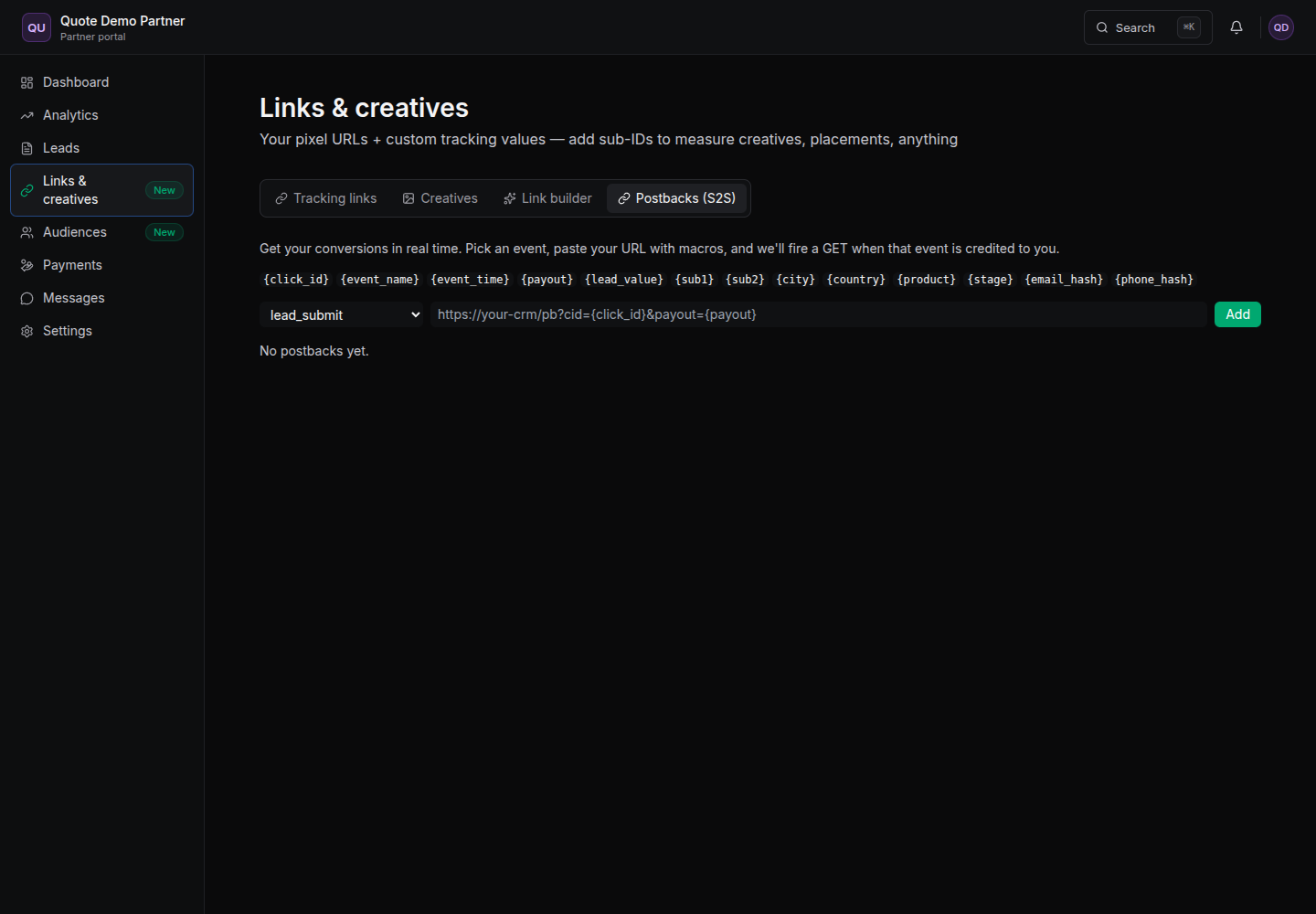
Each row has the buttons you'll use to manage it: Add, Test (fires a sample), an Active toggle, and Delete. Your URL must be https. Cada fila tiene los botones que usaras para administrarla: Agregar, Probar (dispara un ejemplo), un interruptor Active y Eliminar. Tu URL debe ser https.
Macros Macros
Drop any of these macros into your postback URL and RELO will replace them with the real values when it fires: Inserta cualquiera de estos macros en tu URL de postback y RELO los reemplazara con los valores reales al dispararse:
| Macro | What it sendsQue envia |
|---|---|
{click_id} | the click identifier for this conversionel identificador del click de esta conversion |
{event_name} | which event fired (lead_submit, purchase…)que evento se disparo (lead_submit, purchase…) |
{event_time} | when it happenedcuando ocurrio |
{payout} | your payout for this conversiontu pago por esta conversion |
{lead_value} | the lead's valueel valor del lead |
{sub1} {sub2} | your sub IDstus sub IDs |
{city} {country} | visitor locationubicacion del visitante |
{product} {stage} | product and lead stage (raw/qualified)producto y stage del lead (raw/qualified) |
{email_hash} {phone_hash} | hashed identifiers (no raw PII)identificadores hasheados (sin PII crudo) |
Note: RELO only ever sends hashed identifiers — never raw PII. Nota: RELO solo envia identificadores hasheados — nunca PII crudo.
Copy-paste setups Configuraciones listas
Voluum
Map Voluum's cid to our {click_id} so conversions match the right click.
Mapea el cid de Voluum a nuestro {click_id} para que las conversiones empaten con el click correcto.
https://your-domain.voluum.com/postback?cid={click_id}&payout={payout}&txid={event_name}
Binom
Map Binom's cnv_id to our {click_id}; cnv_status takes our {stage}.
Mapea el cnv_id de Binom a nuestro {click_id}; cnv_status toma nuestro {stage}.
https://your-binom-domain/click.php?cnv_id={click_id}&payout={payout}&cnv_status={stage}
RedTrack
Map RedTrack's clickid to our {click_id} and sum to {payout}.
Mapea el clickid de RedTrack a nuestro {click_id} y sum a {payout}.
https://your-rt-domain/postback?clickid={click_id}&sum={payout}&type={event_name}
Generic CRM CRM generico
Map your CRM's click-id field to our {click_id} and add whatever extra fields you store.
Mapea el campo de click-id de tu CRM a nuestro {click_id} y agrega los campos extra que guardes.
https://your-crm.com/relo-postback?cid={click_id}&payout={payout}&ev={event_name}&product={product}
For {click_id} to be populated, your traffic must arrive through the secure t.relo.mx/c/CODE link — it seals the click id. See the Tracking links guide.
Para que {click_id} tenga valor, tu trafico debe llegar a traves del link seguro t.relo.mx/c/CODE — el sella el click id. Consulta la guia de Tracking links.
Testing & gotchas Pruebas y detalles
- Use the Test button and check your endpoint logs to confirm the call arrives.Usa el boton Probar y revisa los logs de tu endpoint para confirmar que la llamada llega.
- The URL must be https.La URL debe ser https.
- The postback must be Active.El postback debe estar Active.
- The event must actually be credited to you — postbacks only fire for your attributed conversions.El evento debe estar realmente acreditado a ti — los postbacks solo se disparan para tus conversiones atribuidas.
- The failure count column flags rejected calls.La columna de conteo de fallos marca las llamadas rechazadas.
- Postbacks are per-event — add one row per event you care about.Los postbacks son por evento — agrega una fila por cada evento que te importe.