The Complete Admin Playbook Guía Completa del Admin
How Relo works, end to end — and exactly how to stand up a brand-new client and run it. Every step, in order, with screenshots of the real platform. If you read one guide, read this one; each step links to the deep-dive when you want more. Cómo funciona Relo, de principio a fin — y exactamente cómo dar de alta un cliente nuevo y operarlo. Cada paso, en orden, con screenshots de la plataforma real. Si lees una sola guía, lee ésta; cada paso enlaza a la guía a fondo cuando quieras más.
- The big pictureEl panorama general
- Create the clientCrear el cliente
- SegmentsSegmentos
- PartnersPartners
- Attribution rulesReglas de atribución
- Commission rulesReglas de comisión
- BudgetsPresupuestos
- CampaignsCampañas
- Fraud rulesReglas de fraude
- The pixel (web)El pixel (web)
- Funnels & conversionsFunnels & conversiones
- MMP via AppsFlyerMMP vía AppsFlyer
- Go live + checklistSalir en vivo + checklist
0. The big picture0. El panorama general
Relo sits between clients (the brands paying for performance — Samsung, Quote, Bancoppel) and partners (affiliates who drive traffic). A customer converts, Relo attributes that conversion to the right partner, and money flows: the client pays Relo, and Relo pays the partners. Relo keeps the margin. Relo está entre los clientes (las marcas que pagan por performance — Samsung, Quote, Bancoppel) y los partners (afiliados que generan tráfico). Un cliente convierte, Relo atribuye esa conversión al partner correcto, y el dinero fluye: el cliente le paga a Relo, y Relo le paga a los partners. Relo se queda el margen.
Every client picks how conversions are tracked — this drives the rest of the setup: Cada cliente elige cómo se trackean las conversiones — esto define el resto del setup:
| Tracking typeTipo de tracking | What it isQué es | Best forIdeal para |
|---|---|---|
mmp | Mobile measurement partner (AppsFlyer): app installs & in-app purchases pulled from the MMP.Mobile measurement partner (AppsFlyer): installs y compras in-app jaladas del MMP. | Mobile apps (e.g. Samsung, Bancoppel).Apps móviles (ej. Samsung, Bancoppel). |
pixel | A web pixel on the client's site: page views, forms, leads, purchases.Un pixel web en el sitio del cliente: page views, forms, leads, compras. | Websites & lead-gen (e.g. Quote, Big Bounce).Sitios web & lead-gen (ej. Quote, Big Bounce). |
hybrid | Both: an MMP feed and a web pixel for the same client.Ambos: feed MMP y pixel web para el mismo cliente. | Clients with an app and a website.Clientes con app y sitio web. |
Want the conceptual tour first? Read How Relo works. Otherwise, follow the steps below in order. ¿Quieres el tour conceptual primero? Lee Cómo funciona Relo. Si no, sigue los pasos de abajo en orden.
1. Create the client1. Crear el cliente
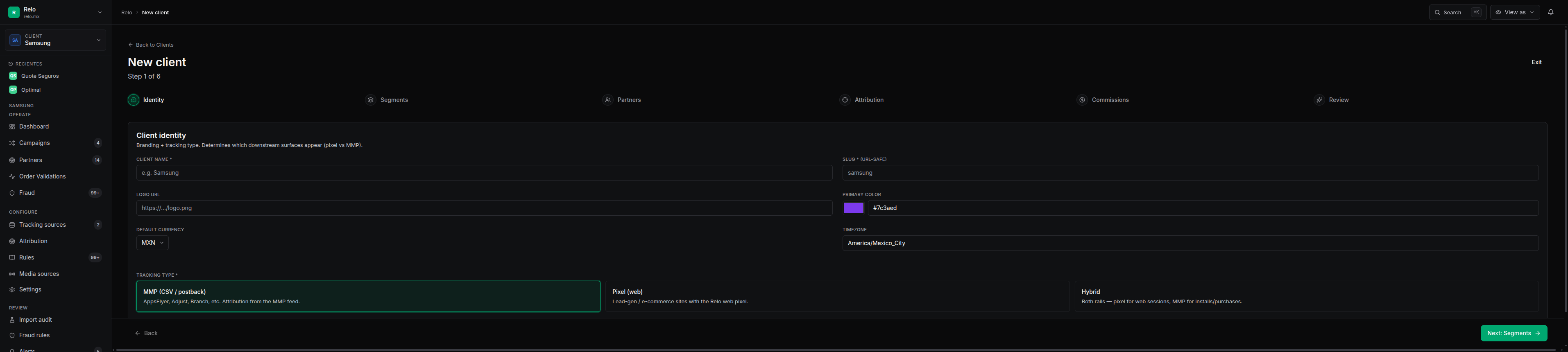
Go to /v2/clients/new and run the onboarding wizard. It collects the client identity (name, slug, tracking type, currency, timezone), segments, partners, attribution, commissions, budgets, optional campaigns, and the fraud-rule template — then creates everything in one atomic transaction (POST /api/clients/onboard). If any step is invalid, nothing is created and the wizard points you at the field that failed.
Ve a /v2/clients/new y corre el wizard de onboarding. Captura la identidad del cliente (nombre, slug, tipo de tracking, moneda, zona horaria), segmentos, partners, atribución, comisiones, presupuestos, campañas opcionales y el template de reglas de fraude — y crea todo en una sola transacción atómica (POST /api/clients/onboard). Si algún paso es inválido, no se crea nada y el wizard te lleva al campo que falló.
The wizard's “Create everything” returns a summary with counters — segments, partners, commissions, budgets (12 months pre-seeded), campaigns, fraud rules, pixel config. Verified against a live dry-run: a hybrid client with all of those landed in one request. El botón “Crear todo” del wizard devuelve un resumen con contadores — segmentos, partners, comisiones, presupuestos (12 meses pre-creados), campañas, reglas de fraude, config del pixel. Verificado con un dry-run en vivo: un cliente hybrid con todo eso se creó en una sola llamada.
Deep dive: Onboarding a client & partners. A fondo: Onboarding de cliente & partners.
2. Segments2. Segmentos
Segments are the product groups you pay on (Samsung uses MX mobile, VD visual display, DA appliances, WR wearables, etc.). Each segment carries a default commission and a color. In the wizard you can start empty, define your own, or click “Copy Samsung defaults” to load a ready set. Lead-gen pixel clients often need none.
Los segmentos son los grupos de producto sobre los que pagas (Samsung usa MX móvil, VD pantallas, DA electrodomésticos, WR wearables, etc.). Cada segmento trae una comisión default y un color. En el wizard puedes empezar vacío, definir los tuyos, o dar clic en “Copiar defaults de Samsung” para cargar un set listo. Los clientes pixel de lead-gen a veces no necesitan ninguno.
3. Partners3. Partners
Add partners as part of onboarding (or later). For each partner you either create new (company + contact) or link an existing one, and you give it its attribution values — the tokens that tag its traffic (e.g. sub2 = qapartner). You also set which segments it's enabled for (null = all, [] = none, or a specific list).
Agrega partners como parte del onboarding (o después). Para cada partner creas uno nuevo (empresa + contacto) o vinculas uno existente, y le das sus valores de atribución — los tokens que etiquetan su tráfico (ej. sub2 = qapartner). También defines en qué segmentos está habilitado (null = todos, [] = ninguno, o una lista específica).
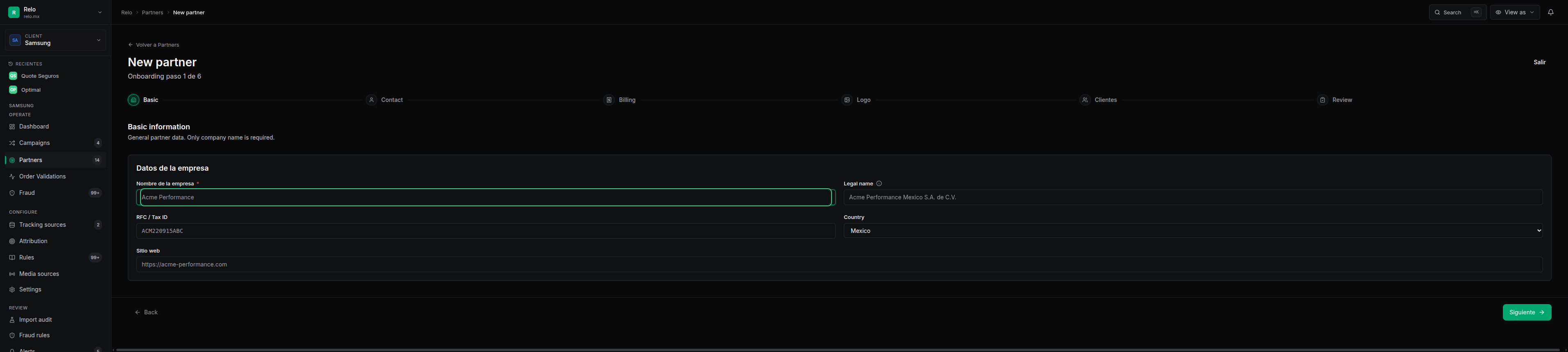
Send a partner an email invitation and they set a password and land in their own portal — no extra setup on your side. Deep dive: Attribution & partners. Envía a un partner una invitación por email y él define una contraseña y entra a su propio portal — sin setup extra de tu lado. A fondo: Atribución & partners.
4. Attribution rules4. Reglas de atribución
Attribution is per-client: the client picks one attribution field (campaign, media_source, sub2, etc.), and every partner gets a list of attribution values matched against that field. When a conversion arrives, Relo reads the field and finds the first partner whose value matches — that partner gets the credit. Already-attributed conversions are never re-stolen by a later rule change.
La atribución es por cliente: el cliente elige un campo de atribución (campaign, media_source, sub2, etc.), y cada partner recibe una lista de valores de atribución que se comparan contra ese campo. Cuando llega una conversión, Relo lee el campo y encuentra el primer partner cuyo valor coincide — ese partner se lleva el crédito. Las conversiones ya atribuidas nunca se las roba un cambio de regla posterior.
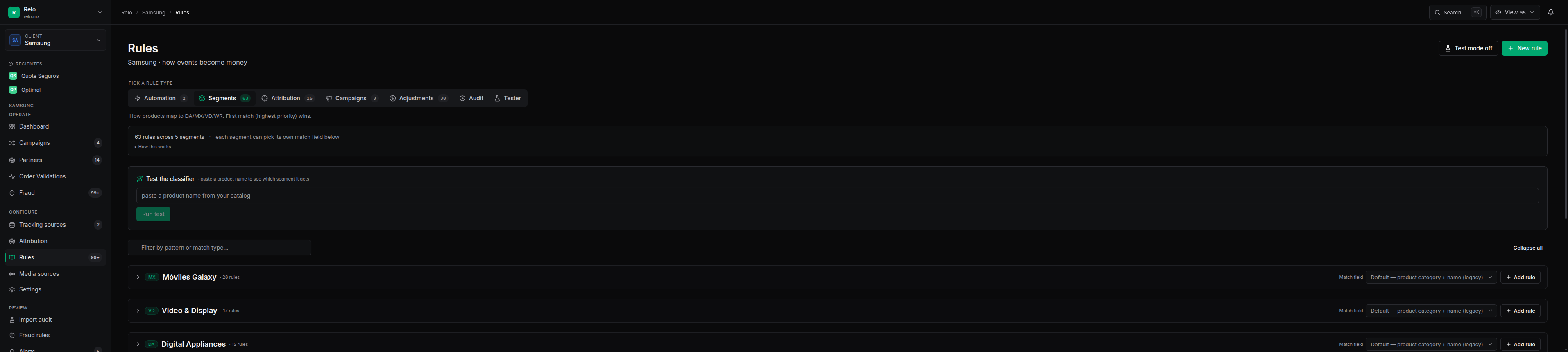
Match types: exact (default), contains, startswith, endswith, regex. The page flags conflicts (two partners that could match the same value) and includes a tester so you can paste a real value and see who would win. Campaigns can inherit the client rules or fork their own.
Tipos de match: exact (default), contains, startswith, endswith, regex. La página marca conflictos (dos partners que podrían matchear el mismo valor) e incluye un tester para pegar un valor real y ver quién ganaría. Las campañas pueden heredar las reglas del cliente o bifurcar (fork) las suyas.
5. Commission rules5. Reglas de comisión
What a partner earns is resolved in a priority chain. From the simplest to the most specific: Lo que gana un partner se resuelve en una cadena de prioridad. De lo más simple a lo más específico:
| RuleRegla | What it doesQué hace |
|---|---|
| Segment commissionComisión por segmento | Base rate per (partner, segment) — e.g. $50/unit or 5% of revenue. Honors effective dates.Tarifa base por (partner, segmento) — ej. $50/unidad o 5% del revenue. Respeta fechas efectivas. |
rate_override | Flat: a special rate for a CID or partner-wide, date-windowed (e.g. a promo). Tiered: a volume ladder (0→3%, 75→3.5%, 150→4%) applied retroactively when the threshold is crossed. Can be campaign-scoped.Plano: una tarifa especial por CID o partner-wide, con ventana de fechas (ej. una promo). Escalonado: una escalera por volumen (0→3%, 75→3.5%, 150→4%) aplicada retroactivamente al cruzar el umbral. Puede ser por campaña. |
budget_override | A per-CID cap carved out of the segment-wide cap (each carve capped independently).Un tope por CID separado del tope del segmento (cada carve se topa de forma independiente). |
| reclassify / filterreclassify / filter | Move a CID's sales from one segment to another before billing, or drop a (CID, segment) from billing entirely.Mueve las ventas de un CID de un segmento a otro antes de facturar, o saca por completo un (CID, segmento) de la facturación. |
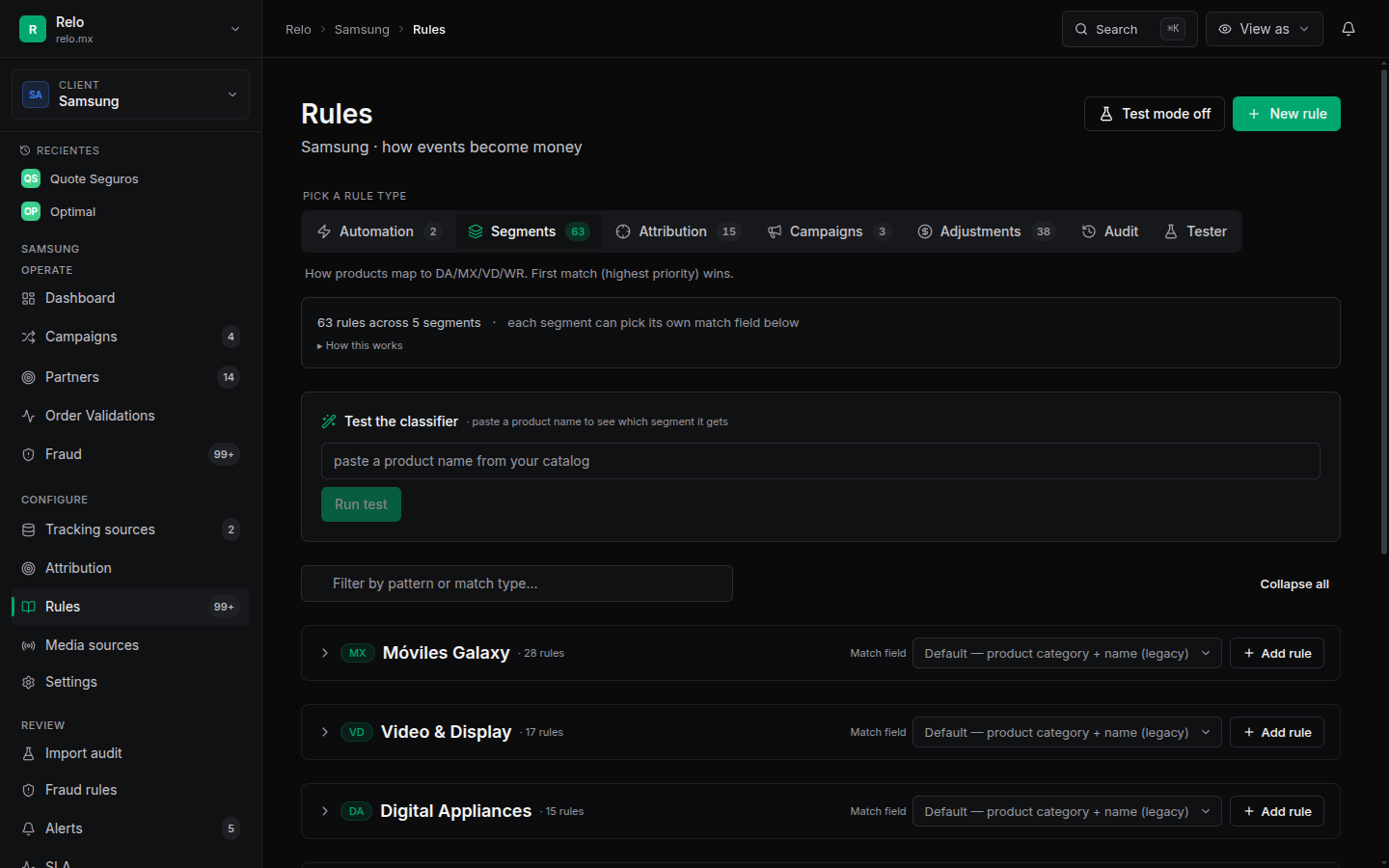
Commissions run on the Go engine, mirrored by a SQL function kept in lock-step for parity. You never touch either — you edit rules in the UI and both pick them up. The math (overrides, tiers, caps) is identical to what the monthly close pays. Las comisiones corren en el motor Go, reflejado por una función SQL mantenida en paridad. Tú nunca tocas ninguno — editas reglas en el UI y ambos las toman. La matemática (overrides, escalones, topes) es idéntica a lo que paga el cierre mensual.
Deep dive: Rules & overrides. A fondo: Reglas & overrides.
6. Budgets6. Presupuestos
A budget caps how much commission a partner can earn in a segment for a month. The wizard pre-seeds 12 months; you adjust them in the Monthly Planner. Three states — get this right, it's money: Un presupuesto topa cuánta comisión puede ganar un partner en un segmento por mes. El wizard pre-crea 12 meses; los ajustas en el Monthly Planner. Tres estados — ten esto claro, es dinero:
- A number > 0 → cap at that amount.Un número > 0 → topa en ese monto.
- 0 → caps at zero — the partner is paid nothing for that segment. (Use this to pause earning, not to mean “unlimited”.)0 → topa en cero — el partner no cobra nada en ese segmento. (Úsalo para pausar, no para decir “ilimitado”.)
- Unlimited (∞) → no cap. Set it with the ∞ / Sin tope button in the planner; it shows as “∞ Sin tope”, not
$0.Ilimitado (∞) → sin tope. Defínelo con el botón ∞ / Sin tope en el planner; se muestra como “∞ Sin tope”, no como$0.
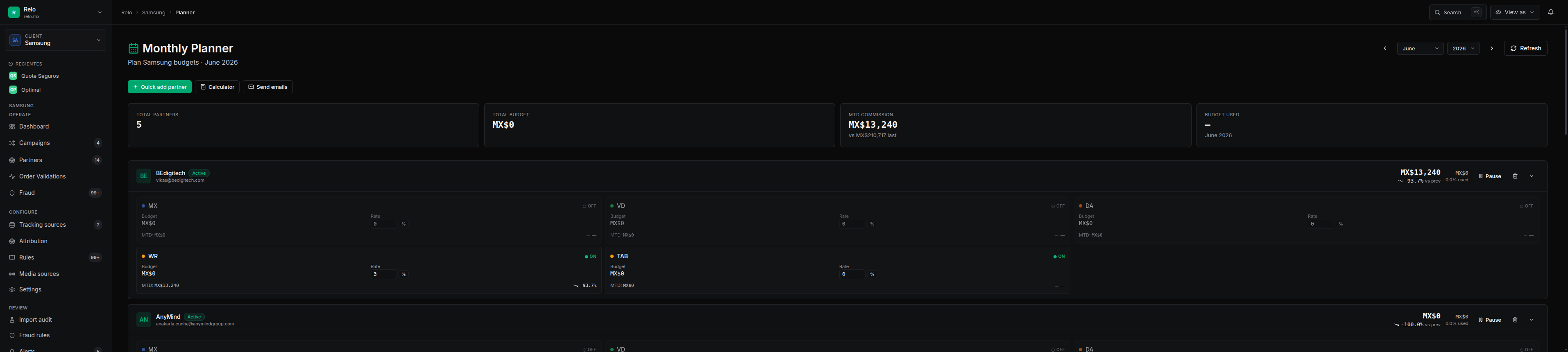
Need a mid-month bump without re-billing what was already earned? The planner supports a mid-month reset (it locks in what's been paid and opens fresh budget from a chosen day forward). Auto-pause can stop a segment automatically when the cap is hit. ¿Necesitas subir el presupuesto a media-mes sin re-facturar lo ya ganado? El planner soporta un reset a media-mes (congela lo ya pagado y abre presupuesto nuevo desde un día elegido). El auto-pause puede detener un segmento automáticamente al llegar al tope.
7. Campaigns7. Campañas
Launch campaigns with the Campaign Launch wizard: name, segment, dates, budget, the partners on it, and auto-generated tracking links/CIDs. A campaign can run with the client's rules, or carry its own overrides on its Reglas tab — campaign-scoped attribution, rates, segment reclassification, and fraud. Each campaign-scoped rule either inherits the client default or forks its own; the engine prefers the campaign rule for traffic in that campaign and falls back to the client rule otherwise. Lanza campañas con el wizard de Campaign Launch: nombre, segmento, fechas, presupuesto, los partners, y links/CIDs de tracking auto-generados. Una campaña puede correr con las reglas del cliente, o llevar sus propios overrides en su pestaña Reglas — atribución, tarifas, reclasificación de segmento y fraude por campaña. Cada regla por campaña hereda el default del cliente o bifurca la suya; el motor prefiere la regla de la campaña para el tráfico de esa campaña y cae a la del cliente si no.
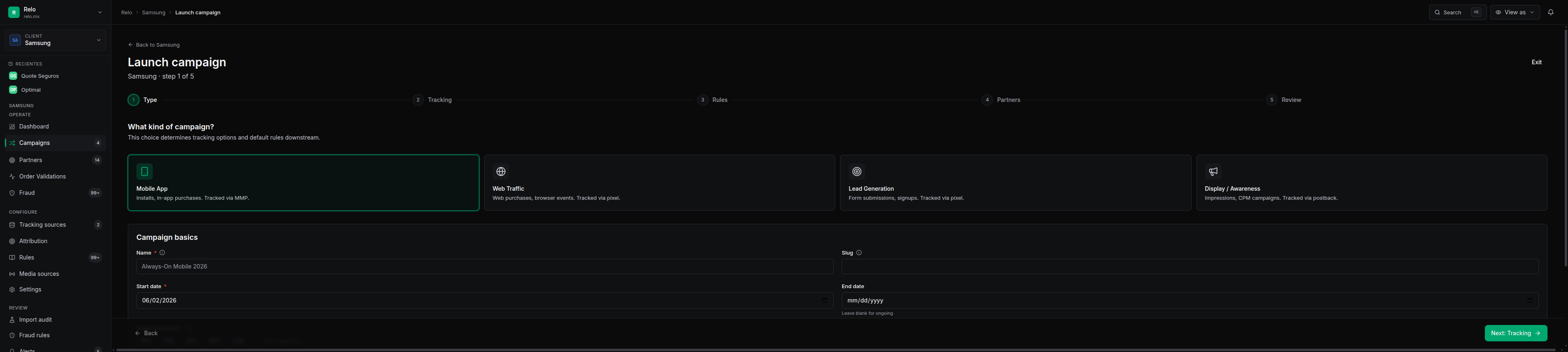
Deep dive: Campaigns & launch. A fondo: Campañas & launch.
8. Fraud rules8. Reglas de fraude
Fraud rules are per-client and hot-reloaded by the Go engine (no deploy to change one). Onboarding seeds a template: samsung_default clones Samsung's 7 rules, minimal seeds 2 starter rules (invalid order id, foreign currency), or none. You edit them on the Fraud Rules page, and flagged events land in the fraud review queue for triage. Fraud can also be campaign-scoped. Las reglas de fraude son por cliente y se recargan en caliente por el motor Go (sin deploy para cambiar una). El onboarding siembra un template: samsung_default clona las 7 reglas de Samsung, minimal siembra 2 reglas iniciales (order id inválido, moneda extranjera), o none. Las editas en la página de Fraud Rules, y los eventos marcados caen en la cola de revisión de fraude para triage. El fraude también puede ser por campaña.
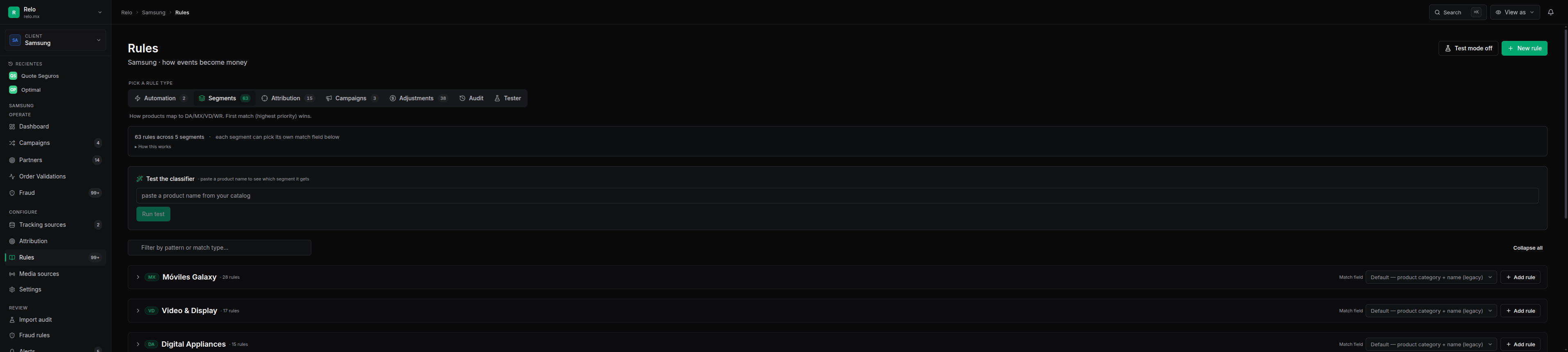
Deep dive: Fraud & quality. A fondo: Fraude & calidad.
9. The pixel (web & hybrid clients)9. El pixel (clientes web & hybrid)
For pixel/hybrid clients, drop one snippet on the site. It works on any website — capture is generic, with no per-site backend code — and auto-captures a rich behavioral catalog (page views, clicks, scroll, forms, …). Para clientes pixel/hybrid, pega un snippet en el sitio. Funciona en cualquier sitio — la captura es genérica, sin código de backend por sitio — y captura solo un catálogo conductual rico (page views, clicks, scroll, forms, …).
<script>
(function(r,e,l,o){r.relo=r.relo||function(){(r.relo.q=r.relo.q||[]).push(arguments)};
o=e.createElement('script');o.async=1;o.src=l;e.head.appendChild(o);
})(window,document,'https://p.relo.mx/r.js');
relo('init', { client_id: 5 });   // your client id
relo('page');                     // page_view
</script>

// fire a lead from the site's form handler:
relo('event', 'lead_submit', { stage: 'raw', lead_value: 1, x_zip: '33101' });
After it's live, click Verify installation in the admin to confirm events are arriving in real time. Lead events carry stage (raw / qualified / sold) and a value (lead_value or revenue). Full install + concepts: Web Pixel.
Una vez en vivo, da clic en Verify installation en el admin para confirmar que llegan eventos en tiempo real. Los eventos de lead llevan stage (raw / qualified / sold) y un valor (lead_value o revenue). Instalación + conceptos completos: Web Pixel.
10. Funnels & conversions10. Funnels & conversiones
On the per-client “Funnels & Conversions” page (Config tab) you build a funnel from the events the pixel actually fires — ordered, named steps with automatic step→step conversion — and mark which events count as billable leads/conversions. No config = a volume funnel; configured = your labeled steps. En la página por cliente “Funnels & Conversions” (pestaña Config) armas un funnel con los eventos que el pixel realmente dispara — pasos ordenados y nombrados con conversión paso→paso automática — y marcas qué eventos cuentan como leads/conversiones facturables. Sin config = funnel por volumen; configurado = tus pasos nombrados.
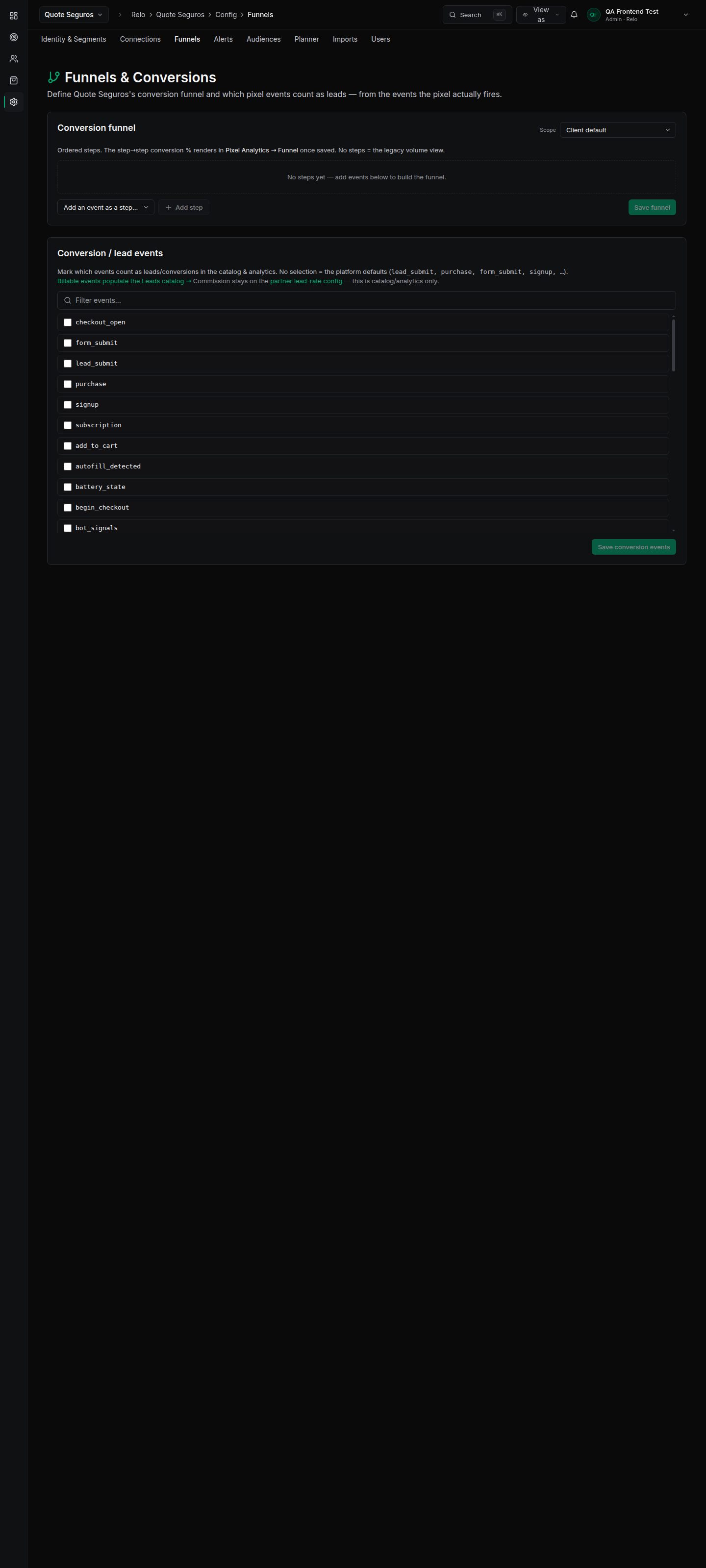
Full how-to (with the API and the click-by-click UI walkthrough): Events, Funnels & Conversions. Guía completa (con el API y el paso-a-paso del UI): Eventos, Funnels & Conversiones.
11. MMP via AppsFlyer (the one extra step)11. MMP vía AppsFlyer (el único paso extra)
For an MMP client (e.g. Bancoppel), everything above is in the wizard — the only step that lives outside it is connecting AppsFlyer. Add a data source on the Tracking Sources page with the client's AppsFlyer api_token + app_id. The Go puller auto-discovers active AppsFlyer data sources and pulls each on its cycle — no deploy, no code change. Data starts flowing on the next pull.
Para un cliente MMP (ej. Bancoppel), todo lo de arriba está en el wizard — el único paso que vive fuera de él es conectar AppsFlyer. Agrega una fuente de datos en la página de Tracking Sources con el api_token + app_id de AppsFlyer del cliente. El puller de Go auto-descubre las fuentes AppsFlyer activas y jala cada una en su ciclo — sin deploy, sin cambiar código. La data empieza a fluir en el siguiente pull.
This AppsFlyer key step is currently outside the onboarding wizard. It's quick (a single data-source row, no deploy), but it is a separate step. Pixel/web clients have no equivalent — they're 100% in the wizard. Este paso de la key de AppsFlyer hoy está fuera del wizard de onboarding. Es rápido (una sola fila de data source, sin deploy), pero es un paso aparte. Los clientes pixel/web no tienen equivalente — son 100% en el wizard.
Deep dives: AppsFlyer · Data pull · Data & imports. A fondo: AppsFlyer · Data pull · Datos & imports.
12. Go live + checklist12. Salir en vivo + checklist
Before you call a client live, walk this list. (This is exactly what a full dry-run checks end to end.) Antes de dar un cliente por vivo, revisa esta lista. (Es exactamente lo que un dry-run completo verifica de punta a punta.)
Client createdCliente creado
Wizard finished; the summary counters match what you entered.El wizard terminó; los contadores del resumen coinciden con lo que capturaste.
Attribution + partnersAtribución + partners
Each partner has attribution values; the conflict check is clean; the tester resolves to the right partner.Cada partner tiene valores de atribución; el chequeo de conflictos está limpio; el tester resuelve al partner correcto.
Commissions + budgetsComisiones + presupuestos
Rates set; budgets are a number, 0, or ∞ on purpose (no accidental $0 caps).Tarifas puestas; los presupuestos son un número, 0, o ∞ a propósito (sin topes $0 accidentales).
Campaigns + fraudCampañas + fraude
Campaigns launched; fraud rules present (or template chosen on purpose).Campañas lanzadas; reglas de fraude presentes (o template elegido a propósito).
Pixel (web/hybrid)Pixel (web/hybrid)
Snippet installed; Verify installation shows live events; the event catalog shows the names you expect.Snippet instalado; Verify installation muestra eventos en vivo; el catálogo muestra los nombres esperados.
Funnel + conversionsFunnel + conversiones
Funnel steps defined (mode reads “configured”); the right events are marked billable; partner lead rates set.Pasos del funnel definidos (el modo dice “configured”); los eventos correctos marcados como facturables; tarifas de lead por partner puestas.
MMP (if applicable)MMP (si aplica)
AppsFlyer data source added; first pull landed; numbers reconcile.Fuente de datos de AppsFlyer agregada; el primer pull llegó; los números reconcilian.
Web/pixel clients are fully self-serve from the wizard (~10 minutes). MMP clients are the same, plus one AppsFlyer key step. Use the standard event names and conversions work out of the box; customize funnels, rules and budgets only when you need to. Los clientes web/pixel son 100% self-serve desde el wizard (~10 minutos). Los clientes MMP son igual, más un paso de la key de AppsFlyer. Usa los nombres de evento estándar y las conversiones funcionan de inmediato; personaliza funnels, reglas y presupuestos solo cuando lo necesites.